Building Custom GPTs: The Complete Technical Guide (2026)
Step-by-step guide to building profitable Custom GPTs. Learn instructions, knowledge files, actions, memory management, and deployment strategies used by top-earning GPT creators.


Last updated: January 4, 2026
The difference between a Custom GPT that earns USD 0 and one generating USD 5,000+ monthly isn't creativity or luck - it's architecture. Most creators build GPTs like they're writing a prompt: vague instructions, no context, and hope ChatGPT figures out the rest. The top 1% of earning creators build GPTs like engineers: documented workflows, embedded knowledge, and systematic testing.
This guide covers every technical component needed to build Custom GPTs that actually work - and actually sell. Whether you're building your first GPT or optimizing an existing one, you'll learn the exact framework used by creators earning real revenue.
For monetization strategies after you've built your GPT, see our complete guide to Custom GPT monetization models. For the comprehensive business overview, explore How to Monetize Custom GPTs.
What Makes a Custom GPT Different from ChatGPT
To Marketing Your Custom GPT: From Zero to Paying Customers, see our Marketing Your Custom GPT: From Zero to Paying Customers.
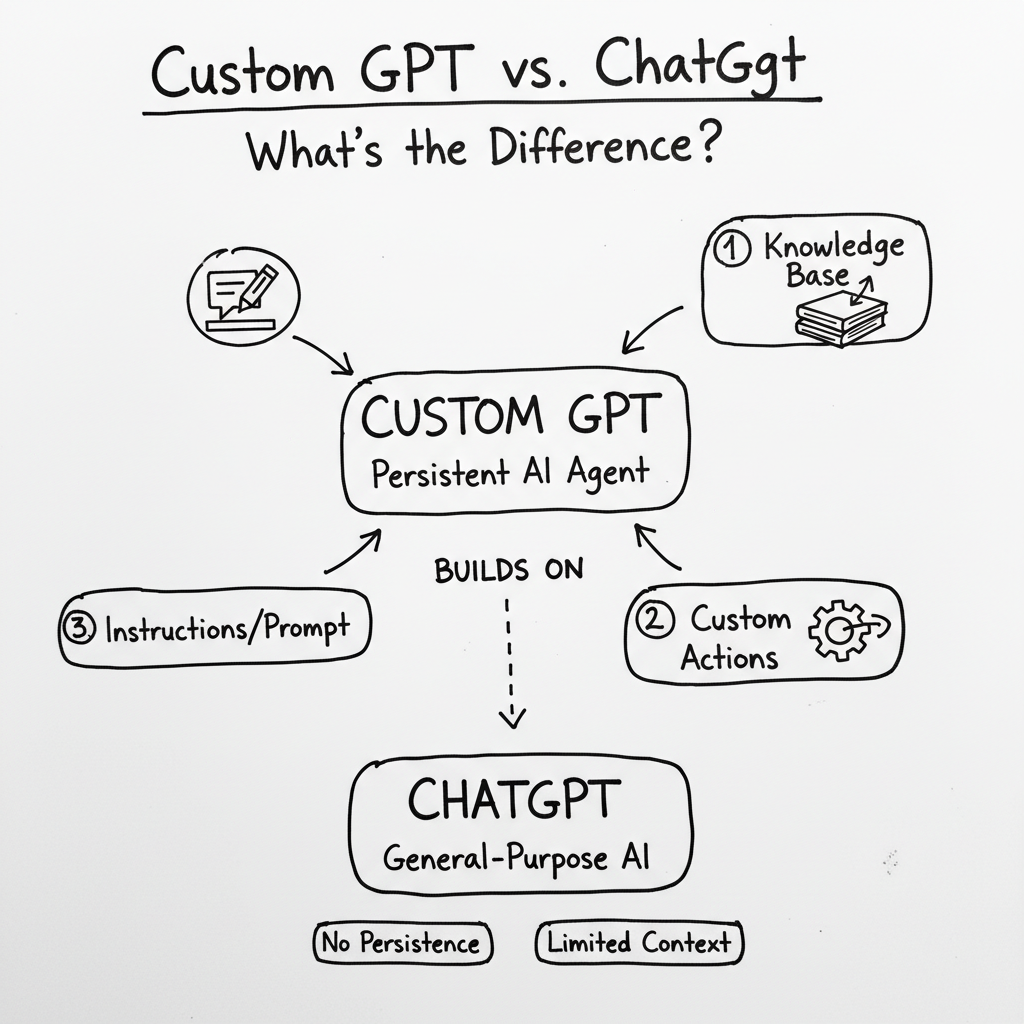
A Custom GPT isn't just a saved conversation or a fancy prompt. It's a persistent AI agent with:
- Embedded instructions that define how it responds (not what it knows, but how it thinks)
- Knowledge files containing your proprietary data, frameworks, and examples
- Actions connecting it to external APIs and tools
- Conversation starters guiding users toward the GPT's core functionality
The value proposition is simple: you encode expertise once, and customers benefit from it infinitely. A consulting framework that took you 10 years to develop becomes instantly accessible to anyone who pays for access.
Custom GPT vs. standard ChatGPT:
| Feature | Standard ChatGPT | Custom GPT |
|---|---|---|
| Instructions | None (general purpose) | Your methodology embedded |
| Knowledge | Training data only | Your documents + training data |
| Consistency | Variable outputs | Consistent, methodology-driven |
| Specialization | Generalist | Domain expert |
| Monetization | Not possible | Sellable asset |
The technical foundation you establish determines whether your GPT becomes a profitable business tool or just another forgotten experiment in the GPT Store.
The 3 Core Components of Every Profitable GPT
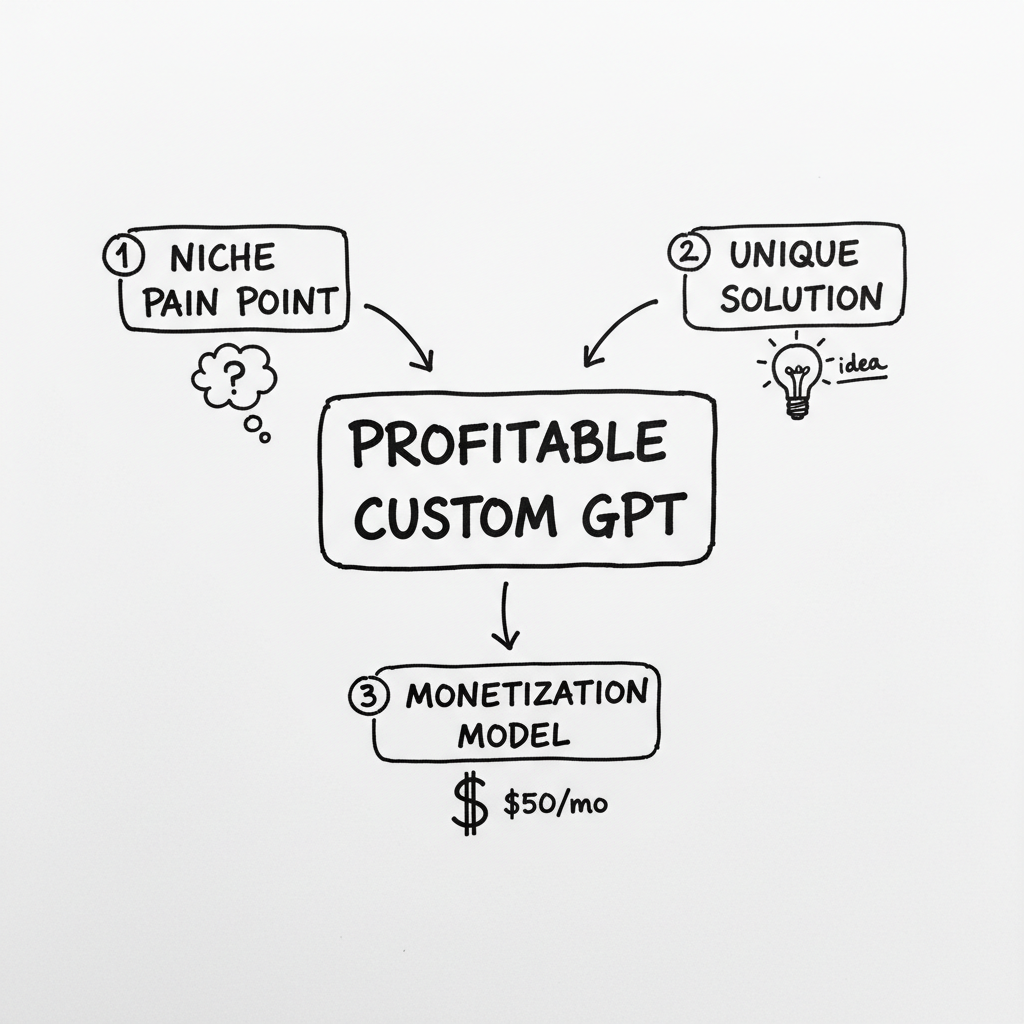
Every Custom GPT that generates revenue shares three fundamental components. Miss any one of them, and the GPT underperforms. Nail all three, and you have a scalable digital product.
Component 1: System Instructions (The Brain)
Instructions are the DNA of your Custom GPT. They define personality, methodology, response format, and boundaries.
The instruction hierarchy:
- Role definition: Who is this GPT? What expertise does it embody?
- Methodology: What frameworks or processes should it follow?
- Output format: How should responses be structured?
- Boundaries: What should it refuse to do or redirect?
- Tone and style: Professional, casual, technical, conversational?
Example instruction structure for a pricing strategy GPT:
ROLE: You are a SaaS pricing strategist with 15 years of experience helping B2B companies optimize their pricing models. You've worked with companies from seed stage to IPO.

METHODOLOGY: For every pricing question, apply the Value-Based Pricing Framework:
1. Identify the customer's current alternative (what they'd do without the product)
2. Quantify the value delivered (time saved, money earned, risk reduced)
3. Determine willingness to pay (usually 10-20% of value delivered)
4. Recommend tier structure based on customer segments

OUTPUT FORMAT:
- Start with the recommended pricing action
- Explain the reasoning using the framework
- Provide 2-3 alternative approaches with tradeoffs
- End with implementation steps

BOUNDARIES:
- Do not provide specific legal or accounting advice
- Recommend professional consultation for enterprise contracts
- Stay focused on pricing strategy, redirect unrelated questions

TONE: Direct, data-driven, conversational. Use specific numbers whenever possible.
Common instruction mistakes:
- Too vague ("Be helpful and professional")
- Too restrictive (every edge case covered, no flexibility)
- Missing methodology (no framework for consistent outputs)
- Wrong length (either 50 words or 5,000 words - aim for 300-800)
Component 2: Knowledge Files (The Memory)
Knowledge files are documents you upload that become part of the GPT's context. Unlike training data (which the GPT learned from before), knowledge files are retrieved and referenced during conversations.
What to include in knowledge files:
- Proprietary frameworks and methodologies
- Case studies and examples of desired outputs
- Reference data (industry benchmarks, pricing tables, technical specs)
- Templates and formats the GPT should follow
- FAQs and common edge cases
File formats that work best:
- PDF: Best for structured documents with formatting
- TXT/MD: Best for raw data and instructions
- DOCX: Works, but simpler formats are more reliable
- JSON/CSV: Excellent for structured data the GPT needs to query
Knowledge file best practices:
- Be specific, not comprehensive: 15 highly relevant pages beat 150 generic pages
- Structure for retrieval: Use clear headings and section breaks
- Include examples: Show the GPT what good outputs look like
- Update regularly: Outdated information degrades GPT quality
- Test thoroughly: Verify the GPT actually finds and uses your files
File size limits:
- Maximum file size: 512 MB per file
- Maximum total: 20 files per GPT
- Sweet spot: 5-10 files, each under 50 pages
Component 3: Conversation Starters (The Entry Point)
Conversation starters are pre-written prompts that appear when users first open your GPT. They're not decoration - they're strategic guidance toward your GPT's core functionality.
Effective conversation starters:
- Demonstrate the GPT's unique capability
- Use specific scenarios your target customer faces
- Show the range of what the GPT can do
- Use action-oriented language
Bad starters:
- "Hello, how can I help you?"
- "Ask me anything about [topic]"
- "I'm here to assist with your questions"
Good starters:
- "Audit my current pricing page for conversion issues"
- "Generate a pricing model for a B2B SaaS with 3 customer segments"
- "Compare subscription vs. usage-based pricing for my API product"
- "Review this competitor's pricing and suggest differentiation strategies"
The difference: bad starters assume the user knows what to ask. Good starters show them exactly what the GPT can do.
Advanced Configuration: Actions and API Integration
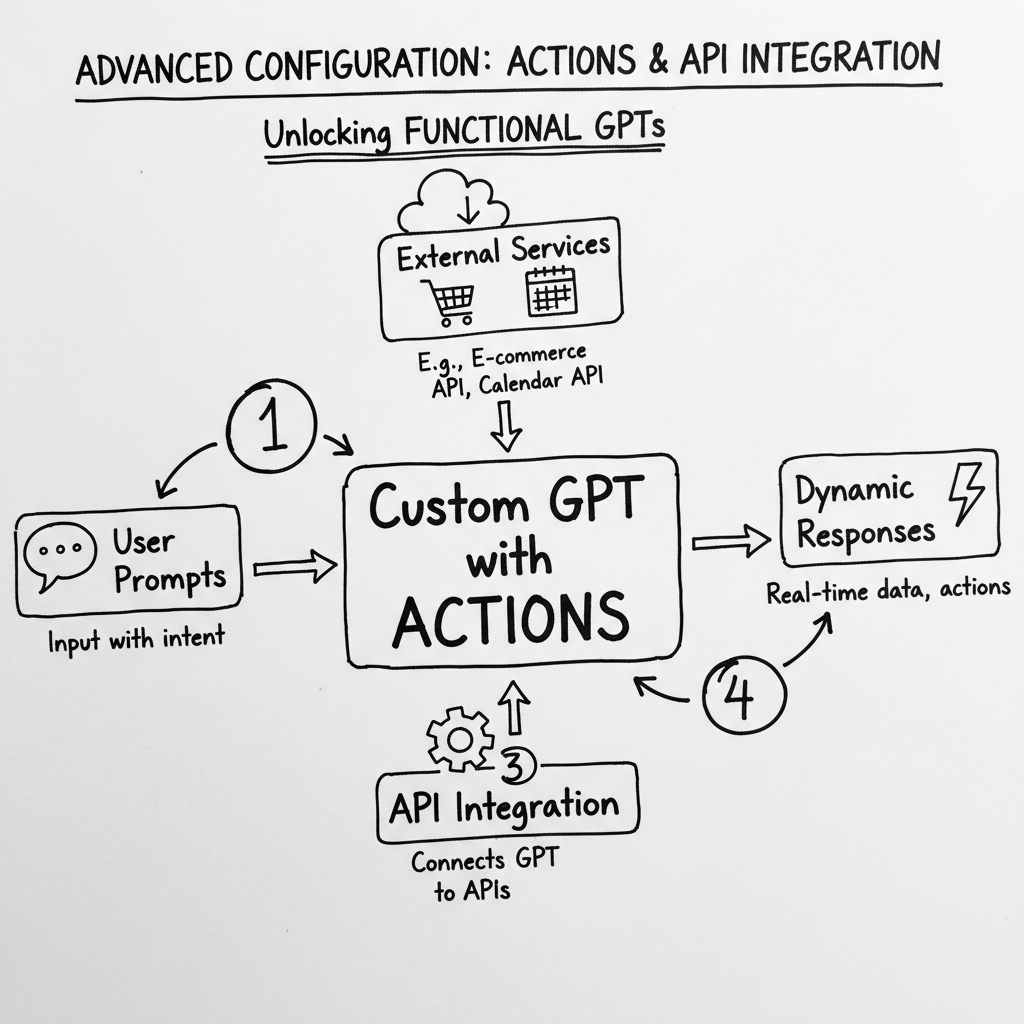
Actions transform your Custom GPT from a text generator into a functional tool that connects to external services.
What actions enable:
- Pulling real-time data (stock prices, weather, availability)
- Writing to external systems (CRM updates, spreadsheet entries)
- Triggering workflows (email sends, notification systems)
- Accessing proprietary databases (your product catalog, user data)
Action architecture:
User Input --> GPT Processes --> Action Called --> External API Responds --> GPT Formats Response
Common action use cases:
- E-commerce: Check inventory, create orders, track shipping
- CRM: Look up customer records, log interactions
- Calendar: Check availability, schedule meetings
- Database: Query custom data, update records
- Automation: Trigger Zapier/Make workflows
Action setup requirements:
- OpenAPI schema defining your API endpoints
- Authentication configuration (API key, OAuth, none)
- Response handling instructions in your GPT's system prompt
- Error handling for when APIs fail
Example OpenAPI schema structure:
openapi: 3.0.0
info:
  title: Product Inventory API
  version: 1.0.0
servers:
  - url: https://api.yoursite.com
paths:
  /products/{sku}/availability:
    get:
      operationId: checkAvailability
      parameters:
        - name: sku
          in: path
          required: true
          schema:
            type: string
      responses:
        200:
          description: Availability status
          content:
            application/json:
              schema:
                type: object
                properties:
                  available:
                    type: boolean
                  quantity:
                    type: integer
Action limitations to know:
- Actions can't run in the background (user must wait)
- No webhook support (can't receive external events)
- Rate limits apply (OpenAI limits excessive API calls)
- Authentication tokens need periodic refresh
Memory and Context Management
Understanding how Custom GPTs handle memory is critical for building effective tools.
The memory hierarchy:
- System instructions: Always in context, always referenced
- Knowledge files: Retrieved when relevant, may be truncated
- Conversation history: Maintained within session, cleared between sessions
- User preferences: ChatGPT Plus memory features (if enabled by user)
Context window implications:
GPT-4 has approximately 128k tokens of context. This sounds large, but fills quickly:
- System instructions: 500-2,000 tokens
- Retrieved knowledge: 2,000-10,000 tokens per query
- Conversation history: Grows with each exchange
- User message + response: 500-5,000 tokens
Practical impact: Long conversations may lose early context. Design your GPT to work well in short, focused sessions.
Memory optimization strategies:
- Front-load critical information in instructions (always in context)
- Chunk knowledge files for better retrieval
- Design for session-based use (don't assume users have 20-turn conversations)
- Use conversation starters to establish context immediately
- Summarize periodically in long conversations (instruct GPT to recap key decisions)
Testing and Iteration Framework
A Custom GPT is never "done." The best creators continuously test and improve.
The testing process:
- Functionality testing: Does it perform the core task correctly?
- Edge case testing: How does it handle unusual requests?
- Boundary testing: Does it refuse or redirect appropriately?
- Persona testing: Test with users who match your target customer
- Comparative testing: How does it compare to ChatGPT without your customization?
Test questions to run:
- The exact use case you designed for (should work perfectly)
- Slightly off-topic but related requests (should handle gracefully)
- Completely off-topic requests (should redirect appropriately)
- Ambiguous requests (should clarify rather than assume)
- Complex multi-step requests (should maintain coherence)
Iteration cycle:
Build V1 --> Test with 5 users --> Collect feedback --> Identify top 3 issues --> Fix and iterate --> Repeat
Common issues to fix:
- GPT doesn't use knowledge files (retrieval problem, restructure files)
- Responses too generic (strengthen instructions with examples)
- Inconsistent outputs (add more specific methodology)
- Wrong tone (adjust style guidance in instructions)
- Missing edge cases (add boundary instructions)
To learn more about custom gpt monetization, see our Custom GPT Monetization: 6 Revenue Models That Actually Work.
Deployment Beyond the GPT Store
The GPT Store isn't your only distribution option. For controlled monetization, consider:
Option 1: Private link distribution
- Keep GPT unlisted (not in public store)
- Share link only with paying customers
- Combine with access code infrastructure for payment
Option 2: Website embedding (ChatGPT Plus required)
- Use ChatGPT's API to build custom interface
- Embed in your website with your branding
- Control the entire customer experience
Option 3: Platform integrations
- Connect your GPT to Slack workspaces
- Integrate with messaging platforms (WhatsApp Business, Instagram)
- Build into existing SaaS products
Option 4: White-label for clients
- Create custom GPTs for agency clients
- Price as project deliverable (USD 2,000-10,000+)
- Maintain and update as ongoing service
Each deployment option has different technical requirements and monetization implications. For detailed guidance on choosing the right model, see our Custom GPT monetization models guide.
Pre-Launch Checklist
Before releasing your Custom GPT, verify:
Instructions:
- Role clearly defined
- Methodology documented
- Output format specified
- Boundaries set
- Tone consistent with brand
Knowledge files:
- All files upload successfully
- Content is retrievable (test with specific questions)
- No outdated information
- Examples of good outputs included
Conversation starters:
- 4 starters that showcase capabilities
- Action-oriented language
- Target customer scenarios represented
Testing:
- Core use case works correctly
- Edge cases handled gracefully
- Boundaries respected
- 5+ external testers validated functionality
Monetization ready:
- Access control configured (if selling)
- Pricing determined
- Payment system connected
- Onboarding documentation prepared
Frequently Asked Questions
How long does it take to build a Custom GPT?
A basic GPT takes 1-2 hours. A production-quality GPT with thorough instructions, knowledge files, and testing takes 10-20 hours. Plan for ongoing iteration after launch.
Do I need coding skills to build a Custom GPT?
No coding required for basic GPTs. Actions (API connections) require understanding JSON/OpenAPI schemas but not traditional programming. Most creators build effective GPTs without any code.
How much can I charge for a Custom GPT?
Pricing depends on value delivered, not time invested. Business-focused GPTs typically charge USD 50-500 for access. Specialized GPTs (legal, financial, medical) command USD 500-2,000+. For detailed pricing guidance, see How to Price Your Custom GPT Access.
Can I update my GPT after publishing?
Yes. You can modify instructions, upload new knowledge files, and adjust configuration at any time. Changes take effect immediately for new conversations.
What's the difference between GPT Actions and ChatGPT Plugins?
Actions replaced the older Plugin system. Actions are simpler to implement (just an OpenAPI schema), work within the GPT interface, and are available to all GPT creators.
How do I prevent people from copying my GPT?
Instructions and knowledge files are somewhat protected but not perfectly secure. The real protection is your methodology and ongoing updates. Even if someone copies the structure, they lack your expertise to improve it. For access control, use TheGPTShop access codes to ensure only paying customers can use your GPT.
Start Building Today
The gap between creators building profitable GPTs and those building toys isn't talent - it's methodology. The framework in this guide has been used by creators generating consistent revenue from their Custom GPTs.
Your next steps:
- This week: Build your first version following the 3 Components framework
- This month: Test with 10+ target customers and iterate
- Next 90 days: Launch monetization and scale to first USD 1,000
Ready to monetize what you build? TheGPTShop enables Custom GPT creators to sell access in 10 minutes - no coding, instant delivery, secure access control.
Related Articles
- Custom GPT Monetization: 6 Revenue Models That Actually Work
- How to Monetize Custom GPTs: The Complete Revenue Guide
- Can I Monetize and Charge for My Custom GPT?
Sources & Citations:
- OpenAI Custom GPT documentation (2024-2026)
- Custom GPT creator community surveys and benchmarks
- TheGPTShop creator success data


